Welcome to CFO Panorama
What CFO Panorama does, how the screen is laid out, the three roles, and how to get help on any page.
CFO Panorama is management reporting that sits beside your accounting software. Your accountant keeps the books in POHODA or Money S3 exactly as before; you export the accounting journal and the lists from it — POHODA as XML, Money S3 as Excel or XML — and upload the files here. CFO Panorama only reads those exports: it never changes your books and never writes anything back to the accounting system.
From the exports it builds a P&L, a balance sheet, a cash flow statement and nearly 50 ratios for each company, for any part of your group and for the whole group, consolidated with intercompany eliminations, in CZK or EUR. You read them on screen, click through to the postings behind any figure, and take them away as Excel workbooks, PDF and a PowerPoint board pack.
How it works in four steps
- Bring in the books. The accounting journal and the lists (chart of accounts, cost centres, activities, contracts) are uploaded once for the history and then again whenever new months are booked. See Uploading files.
- Map the accounts. Each local account is assigned to a line of your group's chart of accounts, so that every company reports on the same lines. Most accounts take the template's default line on their own; you confirm them and map the rest on the Account mapping page or with the mapping assistant. See Mapping.
- Report. Open Reports: choose companies, periods and a currency, click any figure to see the postings behind it, and download Excel or PDF.
- Present. Generate the monthly board pack in PowerPoint, or walk the board through the Boardroom.
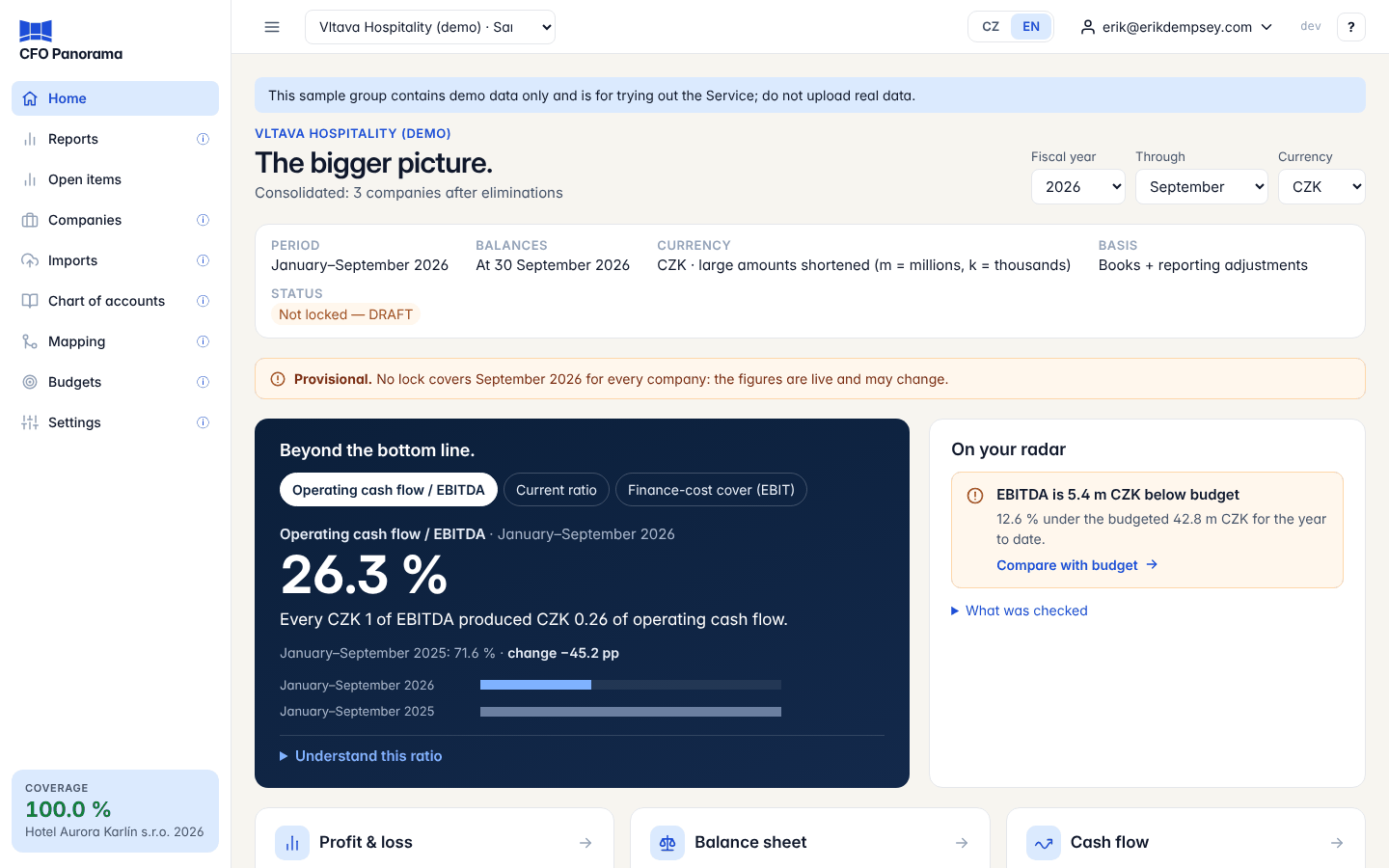
The screen
| Area | What it holds |
|---|---|
| Sidebar (left) | Home, Reports, Open items, Companies, Imports, Chart of accounts, Mapping, Budgets and Settings — you see only the pages your role may use. The ☰ button in the top bar folds the sidebar to icons. |
| Top bar | The group you are working in (a drop-down when you belong to several groups), the language switch CZ / EN, your user menu (Change password, Security, My groups, Log out), the version label and, at the far right, the ? help button. |
| Main area | The page itself. Pages with many figures use working tables: click a heading to sort, drag a column edge to widen it, and use the table toolbar to download or copy. |
The three roles
| Role | Can do |
|---|---|
| Admin | Everything: upload, confirm, discard or undo imports, map accounts, lock periods, post adjustment and elimination journals, approve budgets, invite members, accept the terms and manage the group's settings. |
| Editor | Upload files, map accounts through the mapping assistant and the mapping file, post or dismiss the proposed eliminations, upload budgets. Not settings, members, period locks, hand-written journals or approvals (held imports, budgets). |
| Viewer | Read the reports, drill down, download Excel, PDF and board packs. |
Everyone signs in with a password and, for admins, editors and viewers of client groups, a code from an authenticator app. See Signing in and security.
Getting help on any page
- Click the ? at the right end of the top bar. Help on this page opens the article for the screen you are on in a panel beside it, so you can read and work at the same time.
- Press ? or F1 anywhere (outside a text field) to open the same panel.
- The ⓘ symbols next to some menu items and settings show a one-line explanation when you point at them.
- Documentation and Search the documentation in the ? menu open the documentation in a new tab: every article by category, and a search with or without diacritics (mapovani finds mapování) that also shows results in the other language when it finds none in yours.
- The User manual puts every article on one page — print it or save it as a PDF from your browser.
- Take the tour again in the ? menu replays the short first-login tour; What's new lists recent changes; Contact support writes to us.
Demo groups
If you signed up through Try the demo, you see the demo groups: a hotel group, a restaurant group, a developer, a services company and a retailer, with several years of monthly data. They are read-only, so you can click anything without breaking it. See Trying the demo.
Did not find what you need? Write to erik@cfopanorama.com.