The board pack
Generate the month's briefing as a PowerPoint — the full reference pack or the short Executive briefing — with its findings and questions for management in Excel.
On this page
The board pack is the month's briefing as a PowerPoint, built from the same figures as the reports — nothing on a slide is typed in by hand. Every member of the group can generate one.
Step by step
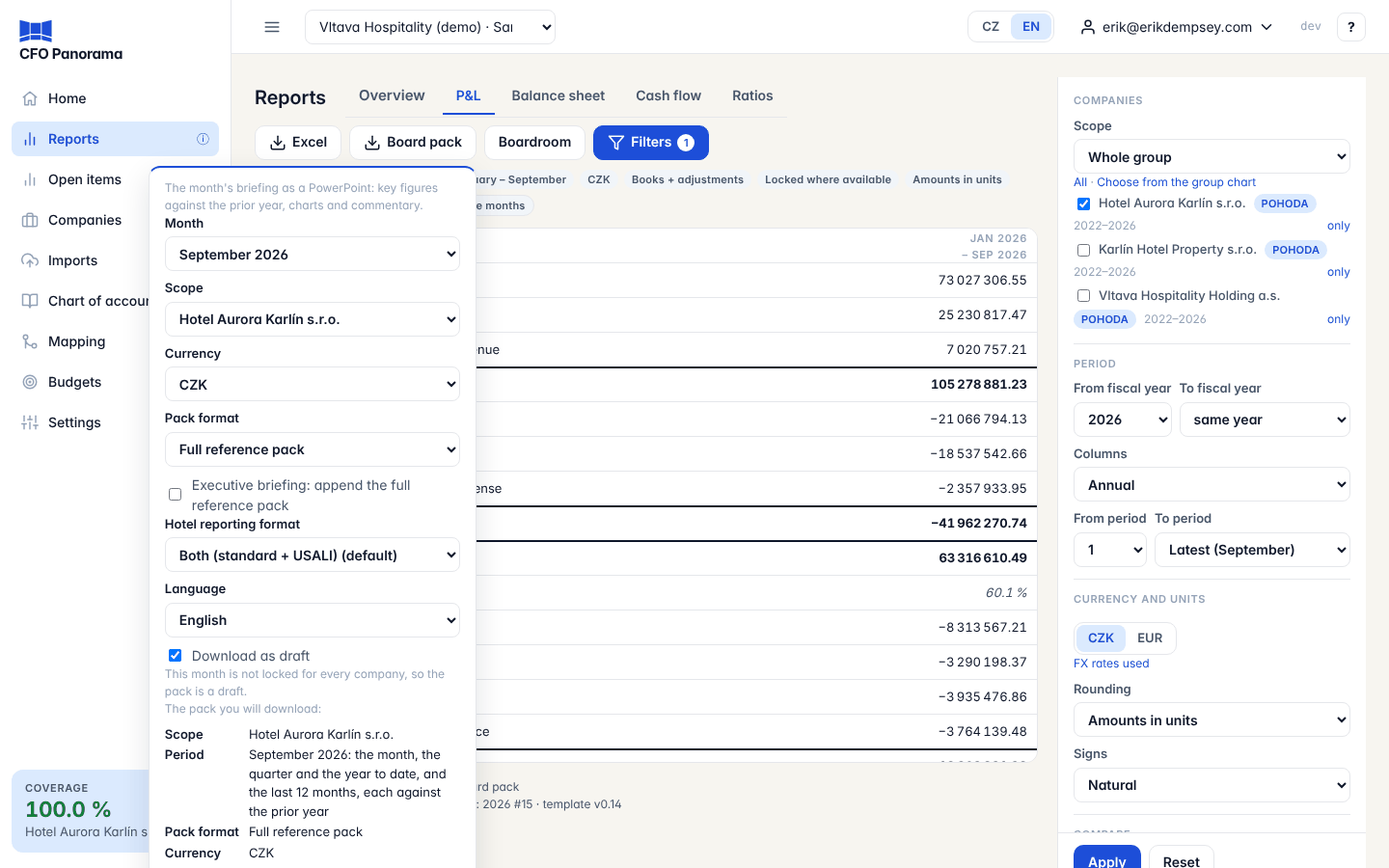
- Open Reports and click Board pack at the top right.
- Choose the options (see below). The form starts from the report you are looking at: its company or saved scope and its last month.
- Check The pack you will download: — it names the scope, the period, the format, the currency, the language and whether the figures are a draft or locked, and changes as you change the options.
- Click Download PowerPoint. Download PDF gives the same deck as a PDF; the button is shown only when the server can convert the deck (it needs LibreOffice installed on the server).
Options
| Option | What it does |
|---|---|
| Month | The month of the pack. Each pack shows the month, the quarter and the year to date, and the last 12 months, each against the prior year — and against the approved budget where there is one. |
| Scope | Group, one company, or a saved scope (see Group structure). A saved scope is consolidated with its own eliminations. Shown only when the group has more than one company. |
| Currency | CZK or EUR, translated at ČNB rates. Shown only when the group reports in more than one currency. |
| Pack format | Executive briefing (8–10 slides) or Full reference pack. |
| Executive briefing: append the full reference pack | Adds the reference pack's slides after the Executive briefing. |
| Hotel reporting format | Hotel groups only: Standard, USALI (the hotel operating statement) or Both (standard + USALI). The default is marked. |
| Language | English or Čeština. |
| Download as draft | Needed when the month is not locked for every company; see below. |
The form remembers the pack format you downloaded last.
Draft or locked figures
A board pack normally shows locked figures — the ones frozen when the month was closed (see Period locks). If the month is not yet locked for every company, Download as draft is ticked for you and the hint under it says so. A draft carries DRAFT — period not locked on every slide and _draft in its file name. If you untick it, the pack is refused with a message naming the companies (or elimination ledgers) still open, and the form opens again with the box ticked.
The full reference pack
The reference pack is the complete monthly briefing, in this order:
- The title and the conclusions: the three most important findings and the board's focus.
- The industry section where it applies: a hotel scope's USALI statement, GOP-to-EBITDA bridge and KPIs; a restaurant group's P&L and outlets; a developer's project report.
- Key figures (Month, QTD, YTD, LTM vs prior year) and results against budget with the EBITDA bridge.
- Cash (VAT shown apart from other taxes), debt by kind with net bank debt, and funding.
- Questions for management.
- The appendix: bridges, balance sheet, net debt, ratios, companies, 13-month trends and the three statements.
- Reporting basis and evidence status — always last: scope, period, currency, basis, lock state, rates, checks.
Charts and tables are native PowerPoint objects you can restyle.
The Executive briefing
For owners and managers without financial training: 8–10 slides, one message each, no text smaller than 12 pt. The cover; the picture at a glance; what changed; results against the prior year and the budget; cash and debt (VAT and the other taxes named separately); 13-month trends; hotel operations (hotel scopes only); companies (scopes of more than one company); decisions and questions; and the reporting basis last.
Findings and questions (Excel)
Findings and questions (Excel) downloads the pack's workbook without the deck: Findings (evidence, possible explanations, proposed owner and action), Management Questions, the industry and budget sheets that apply, Tax Detail (VAT separate from the other taxes), Debt, Checks and Reporting Basis — the same sheets as in the Excel workbook.
Answering the questions
Management fills in the yellow cells of Management Questions: due date, response, status (Open, Answered or Closed) and an evidence reference. Answered needs a response; Closed needs a response and an evidence reference. Keep the Question IDs as they are.
Good to know
- One language per deck. A Czech deck is Czech throughout, an English one English throughout.
- Limit: each person can generate 10 board packs (decks or findings workbooks) per hour.
- The file name carries the group, scope, month, currency and language.
- To present the same figures on screen, use the Boardroom.
Troubleshooting
- "… is not locked for … companies" — tick Download as draft, or lock the month first.
- "The PDF could not be produced on this server; the PowerPoint was downloaded instead." — open the downloaded PowerPoint and save it as PDF.
- "You have generated 10 board packs in the last hour; please try again later." — the hourly limit; wait a while.
- "There is no data for …; no board pack was generated." — choose a month that has imported data.
- "There is no ČNB rate for … for …; no board pack was generated." — the ČNB rates for that month are not loaded yet; choose an earlier month, or try again once the rates are in.
Did not find what you need? Write to erik@cfopanorama.com.