Chart of accounts
The group's Global chart of accounts — the common accounts and report lines every company is mapped to, the default mapping of the Czech and Luxembourg charts, and where each account is used.
On this page
Every company keeps its own chart of accounts in POHODA or Money S3. To report the companies side by side and as a group, CFO Panorama maps each local account to one account of the group's Global chart of accounts. The Global chart decides which line of the P&L, balance sheet and cash flow an amount lands on. Admins and editors open it from Chart of accounts in the sidebar.
One chart per group
Each group has exactly one Global chart. It is created from the CFO Panorama template when the group is set up — the line above the tabs names the Template version and the number of accounts — and then it is the group's own copy. A row changed for your group is marked Edited in the Accounts table and is kept when the template is refreshed.
The four tabs
| Tab | What it shows |
|---|---|
| Accounts | Every Global account: Code, Name EN, Name CS, Statement (PL or BS), Section, Line and Contra line of the statements, Normal balance, Rate policy (which exchange rate translates it), Cash-flow class, IFRS class, Active, Edited. |
| Statements | The report layouts — P&L, balance sheet, cash flow, ratios and, for industry groups, the operating P&L. Open a layout to see its sections and lines, each with its formula and the accounts that feed it. Expand all opens every line. |
| Default mapping | Which Global account a local account takes until a company maps it explicitly. One tab per chart family with its row count: Czech statutory chart and Luxembourg PCN. |
| Reference data | The Global dimensions and their values, the Cash-flow classes with the lines they feed, and the Rate policy counts. |
Search
Type into Search and click Search. The results list matching accounts, report lines and default-mapping rows, in English and Czech, with or without diacritics. An exact account code opens that account straight away.
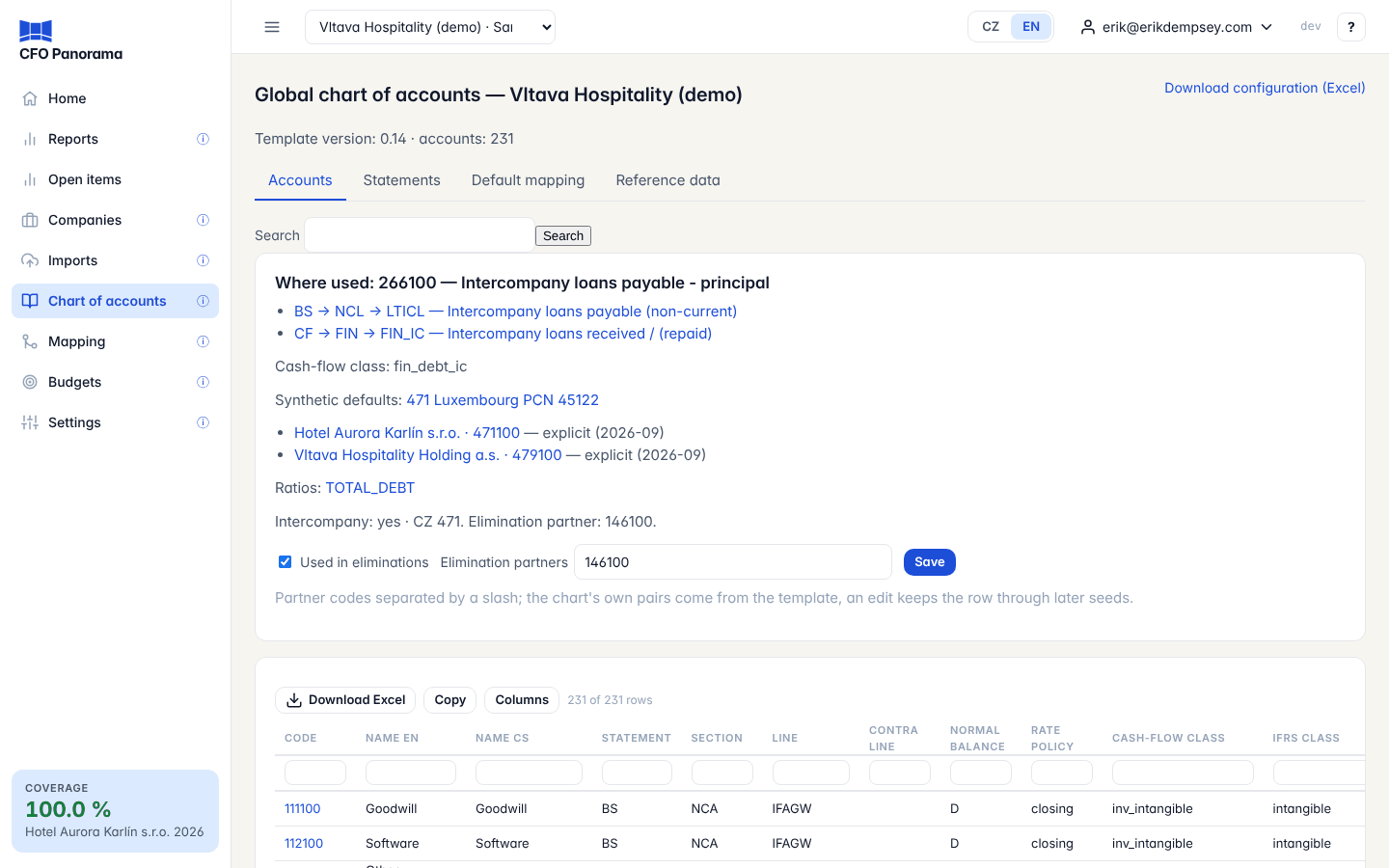
The account card
Click an account code on the Accounts tab. The card Where used shows:
- the report lines the account feeds, each linked to the Statements tab;
- its Cash-flow class and the Synthetic defaults that point to it;
- the local accounts of each company that report on it in the company's latest month with postings, by an explicit mapping or by a default — each links to that company's account mapping;
- the Ratios that read those lines;
- Intercompany — whether the account carries balances between group companies.
Used in eliminations and partner accounts
Admins see two fields on the card:
- Used in eliminations — tick it for an account that holds balances or transactions with other group companies, such as an intercompany loan or intercompany revenue;
- Elimination partners — the account codes on the other side, separated by a slash (for example
266100 / 266200).
Click Save. Eliminations and the intercompany balances screen then pair the two sides. The template already carries the usual pairs; your edit is kept through later template refreshes. Editors and viewers see the two values read-only.
Default mapping
A local account that has no explicit mapping yet takes a default, so the reports show it on a sensible line from the first upload:
- Czech statutory chart: by its three-digit synthetic account (syntetický účet) — for example every
518…account goes to the default of518. The tab shows the synthetic, its Czech name, the Global account, the Confidence of the default (high, medium or low), how many local accounts use it (Used by) and a note. - Luxembourg PCN: by the longest matching prefix of the account code, with the PCN caption.
The chart family of each company is shown on its company page. A low-confidence default carries the amount on the default's line but counts as not covered until someone maps the account; see Account mapping and coverage.
Download configuration (Excel)
Download configuration (Excel) at the top of the page downloads the group's whole configuration as a workbook in the layout of the template — accounts, report lines, cash-flow definition, defaults, dimensions — with a README sheet (group, date, template version, who downloaded it) and a sheet Diff_to_template listing every value where your group differs from the template it was seeded from. Use it to review the chart with your accountant or auditor.
Did not find what you need? Write to erik@cfopanorama.com.