Companies
The group's companies with their source system and latest year, and each company's page — what was imported, the trial balance, locks, journals, lists — with links to its mapping and controls.
On this page
Companies lists every company of the group. Each company has its own page: what was imported for it, its trial balance, its period locks and journals, its lists — and the links to everything you do for that company. Admins and editors use these pages; in the demo groups viewers can read them too.
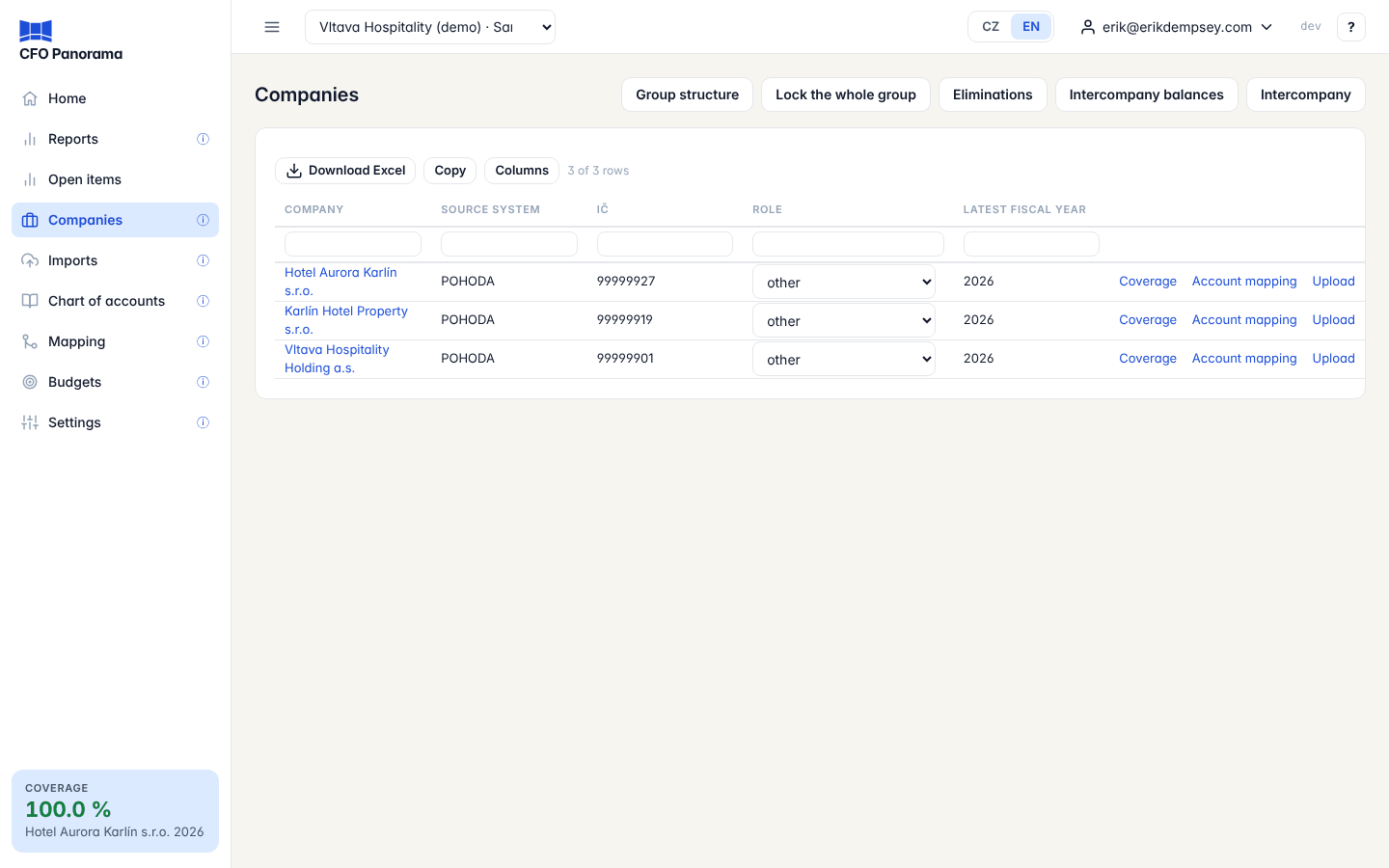
The Companies list
| Column | Meaning |
|---|---|
| Company | The name, with a locked through m/yyyy chip for each fiscal year that has an active period lock. |
| Source system | POHODA, Money, or another system the company's books come from. |
| IČ | The company's registration number. |
| Role | Parent company, property company, operating company or other. |
| Latest fiscal year | The latest year with an applied journal. |
| (links) | Coverage, Account mapping and Upload for that company. |
The buttons above the list open the group-wide pages: Group structure, Lock the whole group, Eliminations, Intercompany balances and Intercompany. Admins of a client group also see Add company, which leads to Settings → Companies.
The company role
Admins set each company's Role directly in the list — pick a value and it is saved. The board pack uses the role when it explains a change: its findings say whether the change sits in the parent, a property company or an operating company. The role changes no figure.
The company page
The page opens with the company's facts: Source system, IČ, Country, Chart of accounts (Czech statutory chart or Luxembourg PCN), Functional currency and Fiscal year start month.
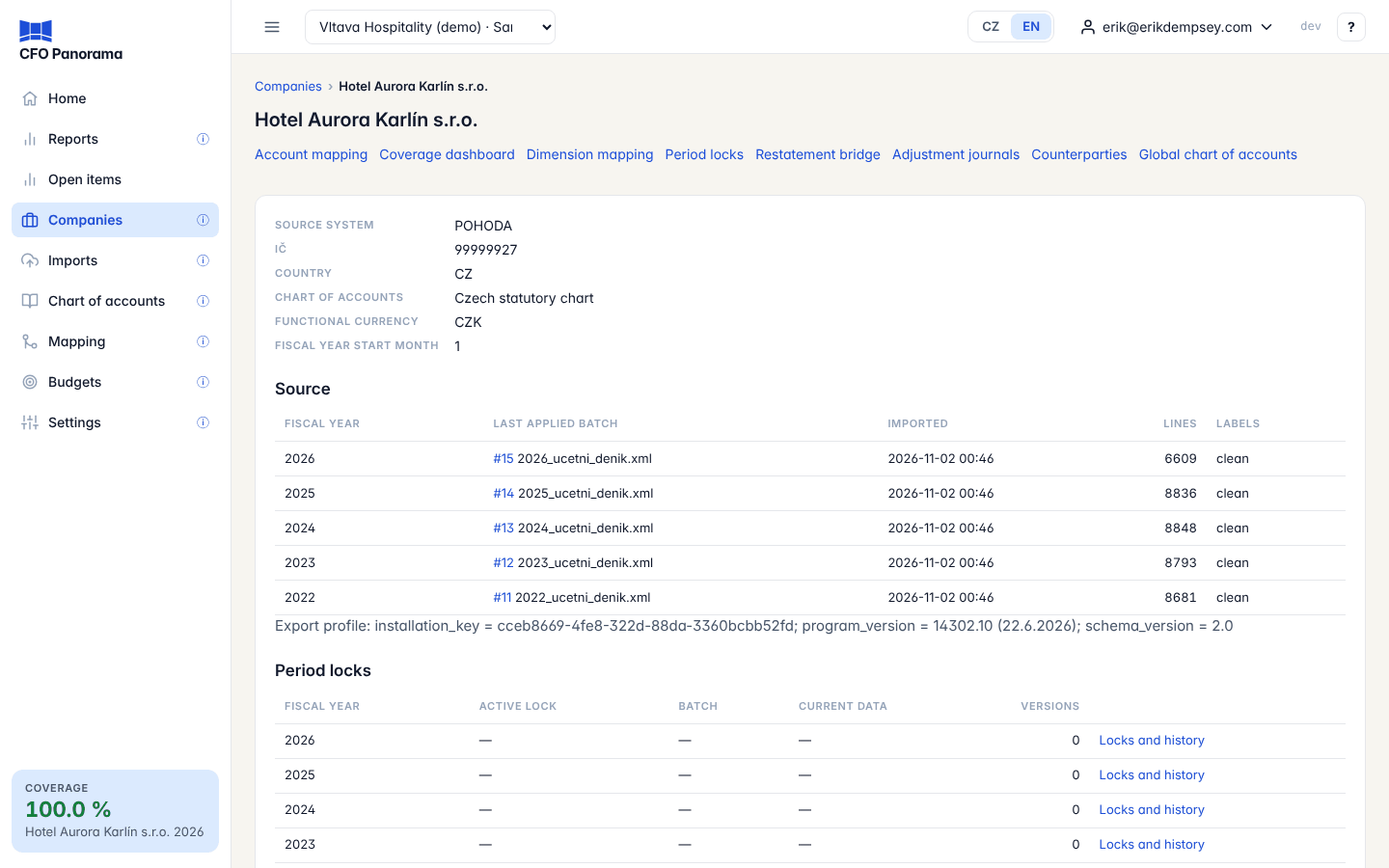
Source
One row per fiscal year with the Last applied batch, when it was Imported, its Lines and whether its Labels are clean or degraded (lost diacritics). Below it:
- Pending confirmation: journals waiting for an admin — see Imports;
- a note when the last batch changed lines in locked periods, with Open the bridge.
Period locks and adjustment journals
Period locks shows per fiscal year the active lock and its version, the batch it was taken from, and whether the current data equal the snapshot or current data differ; Locks and history opens the company's lock page. Adjustment journals shows per year how many journals were posted, their debit total and the last one.
Master data
The lists last imported for the company — accounts, centres, activities, contracts, series — with their item count, the import and its export date, and how many accounts found in the journal have no name yet. A name arrives with the next chart-of-accounts list.
Continuity breaks
When a year's opening balances in the books differ from the closing balances the platform rolled forward from the year before, the accounts are listed here with both figures. The rolled figure is the one reported.
Trial balance
The trial balance of the latest fiscal year: every account with its Debit balance or Credit balance and the Total of each column. It counts current lines with opening balances and without closing entries. The two totals are equal when the year is complete; use them to check the import against the accounting system.
The company's pages
The links under the company's name:
| Link | What it does |
|---|---|
| Account mapping | The company's local accounts and the group-chart line each goes to. See Account mapping and coverage. |
| Coverage dashboard | How much of the P&L and the balance sheet is mapped. |
| Dimension mapping | Cost centres, activities and jobs to the group's dimensions. See Dimensions. |
| Period locks | Lock reported months so later imports do not change them. See Period locks. |
| Restatement bridge | The difference between a locked version and the current data, or between two lock versions. See Restatement bridge. |
| Adjustment journals | Reporting-only journals of this company. |
| Counterparties | The company's partners, and which of them are companies of the group. See Counterparties. |
| Global chart of accounts | The group chart. See Chart of accounts. |
Delete a fiscal year
The admin of a client group sees a Danger zone at the bottom of the page with Delete this fiscal year's data for each year with imported journals. It removes the year's journal lines, its monthly figures and the stored files; adjustment and elimination journals stay. You confirm by typing the company's IČO, and a recent second-factor code is required. It is refused while the year has an active period lock. See Imports.
Did not find what you need? Write to erik@cfopanorama.com.