Exchange rates
How reports in EUR or CZK are translated at ČNB rates — monthly averages for the P&L, closing rates for balances, posting-date rates for equity — and where to see the rates a report used.
On this page
Every report can be shown in CZK or EUR: choose the currency under Filters → Currency and units. When the report's currency differs from the currency of a company's books, CFO Panorama translates the figures at the official rates of the Czech National Bank (ČNB). Nothing in the books changes; only the presentation does.
Which rate is used where
| What | Rate |
|---|---|
| P&L lines | Each month at that month's average ČNB rate (the mean of the daily fixings). A quarter or a year is the sum of its translated months, so monthly, quarterly and annual columns always add up. |
| Balances (assets and liabilities) | The closing rate: the last ČNB fixing on or before the balance-sheet date. |
| Equity (share capital and other historical items) | The rate of the posting date of each entry, so equity does not move with the exchange rate. |
| Translation reserve (CTA) | The difference these rates create on the balance sheet, on its own equity line. |
| Cash flow | Flows at the monthly averages, cash at the closing rate; the difference is the Effect of exchange-rate changes on cash. |
Budgets are the exception: a budget column is shown at the budget's own rate, set when the budget is uploaded, never at ČNB rates. Open items are converted at the ČNB closing rate of the snapshot date.
See the rates a report used
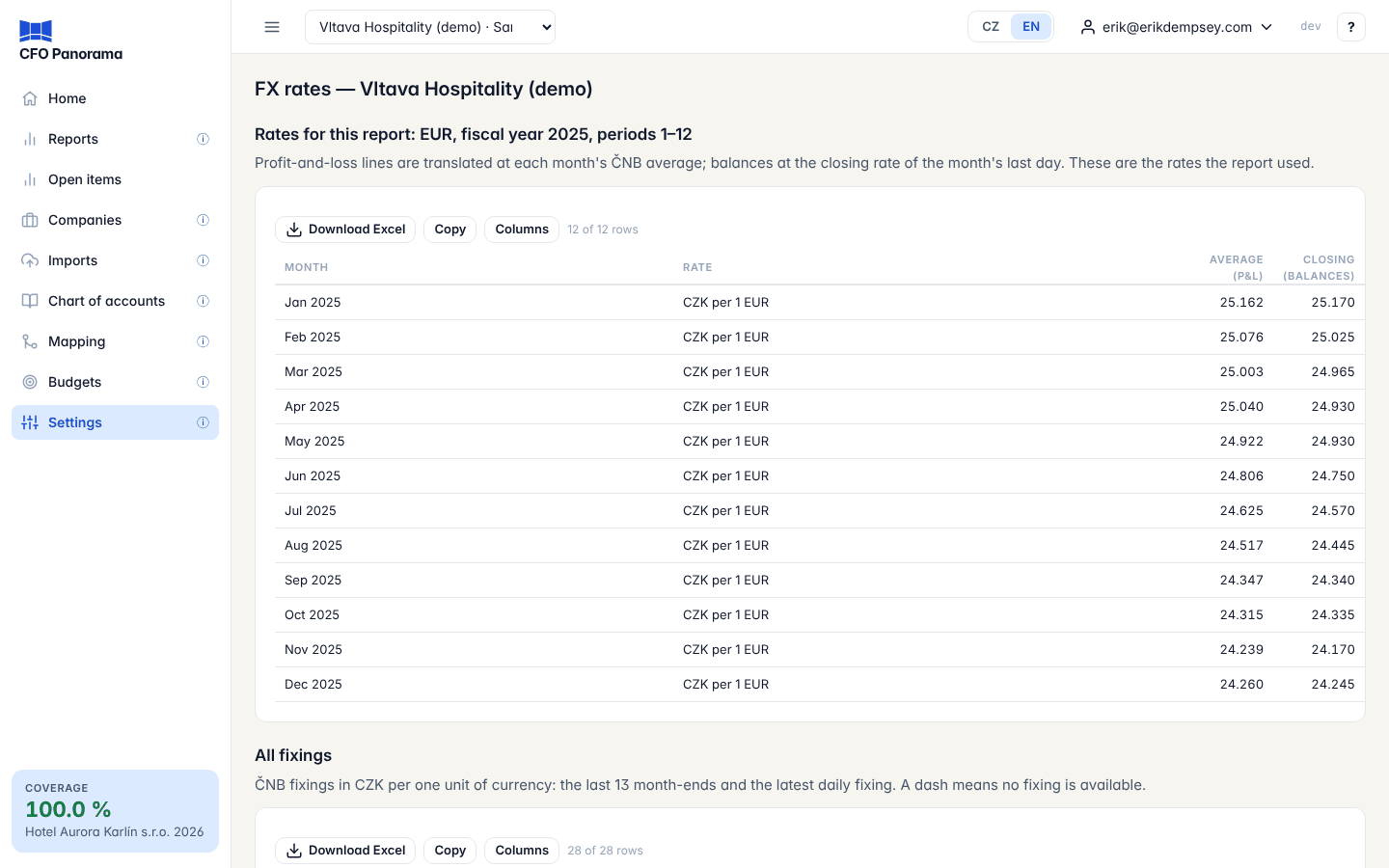
- In the filter panel, click FX rates used under Currency and units. The FX rates page opens with Rates for this report — its currency, fiscal year and periods — and, month by month, the Average (P&L) and Closing (balances) rate used.
- Below it, All fixings lists the ČNB fixings in CZK per one unit of currency: the last 13 month-ends and the latest daily fixing. A dash means no fixing is available.
- Under each report, Provenance → Rates lists the ČNB monthly averages, the closing rates and the number of posting-date rates used for equity, and how far the rates are loaded. For a report that needs no translation it says none needed.
Admins also reach the FX rates page from Settings.
Where the rates come from
The ČNB publishes its fixing at 14:30 on Czech business days. CFO Panorama loads every currency of it shortly after, each business day. Weekends and Czech public holidays have no fixing, and no rate is ever invented for them: the last fixing before the date is used.
Troubleshooting
- "No ČNB fixing for EUR at …" — the rate for that date has not been loaded yet (for example a month that has only just ended, before the ČNB has published). The report names the missing rate instead of using an older one; please tell CFO Panorama support if it persists.
- EUR growth differs from CZK growth. This is the rate movement described above, not an error.
Did not find what you need? Write to erik@cfopanorama.com.