Report filters
Every section of the Filters panel on the Reports page — companies, period, currency and units, the companies view, comparisons, data and basis, dimensions and display.
On this page
The Filters panel on the right of the Reports page decides what the statement shows. Most changes apply by themselves a moment after you make them; Apply runs the report at once and, on a smaller screen, folds the panel. The number on the Filters button counts the settings that differ from the defaults.
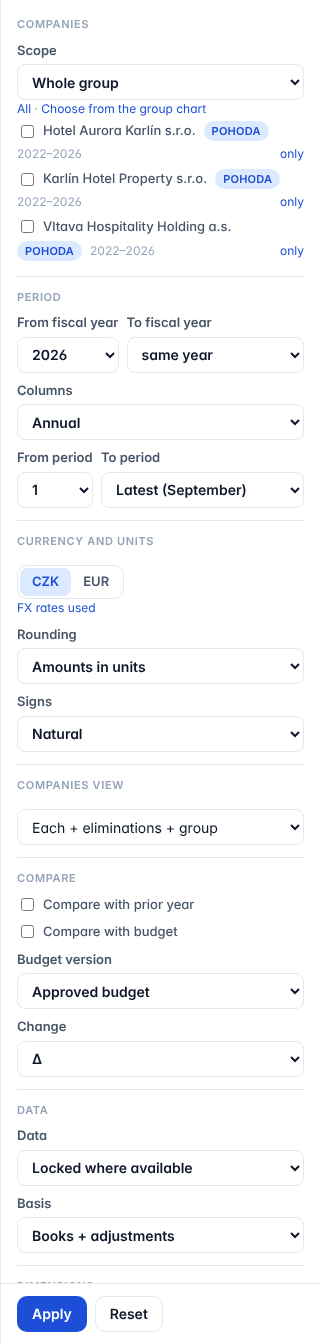
Not every section appears on every tab: the cash flow has no signs, dimensions or unmapped accounts; the Ratios tab has no rounding either, and of Display only the layout.
Companies
- Scope — Whole group, or a saved scope of your group (for example Hotel property and operations). A scope picks the companies for you; a scope of several companies is consolidated with its own Eliminations column. To pick companies yourself, choose Whole group.
- The company list — tick the companies to show; each shows its accounting system and years with data. only shows that company alone; All shows every company again.
- Choose from the group chart — pick companies or a scope on the group structure chart, then Show in ….
A group with only one company has no Companies section.
Period
- From fiscal year and To fiscal year — same year, or a later year to show several years side by side.
- Columns — Annual · Quarterly · Monthly · Year to date · One range.
- From period and To period — the months (1–12) of the fiscal year. Latest (…), with the name of the last month that has data, is the default To period; it moves on by itself when new months are imported. On the balance sheet with One range, To period also offers opening (the opening balances).
With several fiscal years, From period and To period cut the last year only.
Currency and units
- CZK | EUR — the currency of the report. Profit-and-loss lines are translated at the ČNB monthly averages, balances at the closing rate. FX rates used opens the rates this report uses. See Exchange rates.
- Rounding — Amounts in units or Amounts in thousands.
- Signs — Natural: revenue positive and costs negative; assets, liabilities and equity positive. Positive: each cost line is shown as a positive number; the subtotals do not change. The cash flow is always signed as cash in (+) and cash out (−).
Companies view
| Option | Columns |
|---|---|
| Each + sum of companies (before eliminations) | Each company, then their sum. |
| Sum of companies (before eliminations) | Only the sum. |
| Each company | Each company, no total. |
| Each + eliminations + group | Each company, the Eliminations column and the Group. |
| Sum of companies (before eliminations), eliminations, group | The sum, Eliminations and the Group. |
| Group only | The consolidated Group alone. |
The last three need the whole group or a scope: companies ticked one by one are added up, never consolidated. A group with eliminations opens on Each + eliminations + group. On the Ratios tab the Eliminations column is left out (see Ratios).
Compare
- Compare with prior year — adds the same months of the previous fiscal year (not needed when several years are shown).
- Compare with budget and Budget version — on the P&L, for one fiscal year, when the group has a budget for it. Approved budget is the default. See Financial statements.
- Change — Δ (the difference), Δ %, Δ and Δ %, or none. On the Ratios tab only Δ or none.
Data
- Data — Locked where available shows a locked month as it was locked; months without a lock show today's books. Current shows today's books everywhere, even in locked months.
- Basis — Books + adjustments (the default) adds the adjustment journals made in CFO Panorama on a company, for example a reporting-only allocation of central costs. Books only shows each company's accounting exactly as it came from POHODA or Money S3. The eliminations between group companies apply on both bases, in the Eliminations and Group columns: a management fee one group company charges another is in both companies' books, and in the Group column it no longer counts as revenue.
Dimensions
On the P&L and the balance sheet, when the group has dimensions (for example cost centres, departments, hotels or projects):
- Filter dimension and Filter values — show only the postings of the chosen values (hold Ctrl or ⌘ to pick several).
- Split columns by — one column per value of a dimension, for example one per hotel.
Display
- Layout — the shape of the statement. On the P&L: P&L — by nature, P&L — operational (USALI) for hotels, and your industry's own layout where the group has one (for example Restaurant management P&L). See Financial statements and Hotel statistics and USALI.
- Amounts · % of revenue · Amounts + % of revenue — the figures, each line as a share of total revenue, or both (on the balance sheet: % of total assets). Index, offered for a series of columns, shows each line against its first column (= 100).
- Show empty lines — also the lines with no figure.
- Totals only — subtotals and totals without the detail lines.
- Show unmapped accounts — lists the local accounts that are not mapped yet, under the unmapped line.
Apply and Reset
Apply runs the report. Reset clears the selection CFO Panorama remembers for you in this group and shows the defaults: the whole group, the latest fiscal year to its latest month, the group's currency.
Did not find what you need? Write to erik@cfopanorama.com.