Legal documents and company details
The terms and data processing agreement your group accepted, the acceptance record and its PDFs, your companies' details, the controller details and the request to delete all data.
On this page
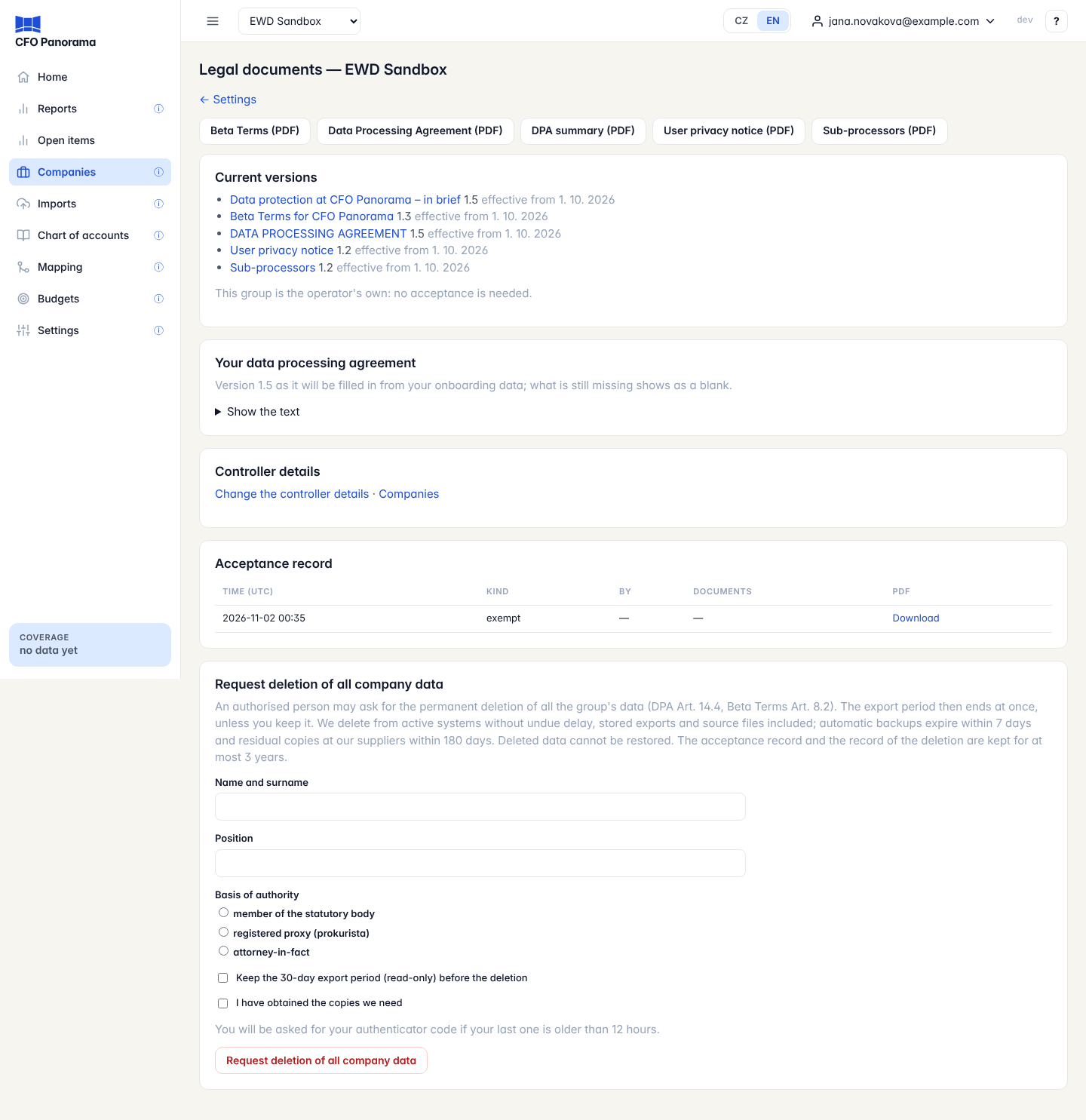
Before any data is uploaded, an admin of your group accepts the Beta Terms and the Data Processing Agreement (DPA) on behalf of your companies. Settings → Legal documents keeps everything about that agreement in one place: the documents as filled in for your group, the record of every acceptance, the companies it covers and the controller details. The request to delete all your data is made here too.
Only admins of a client group see these pages. Accepting, confirming and requesting deletion are always your own acts: a CFO Panorama platform user who opens your group cannot do them for you.
The documents as PDF
The buttons at the top download each document filled in from your group's data: Beta Terms (PDF), Data Processing Agreement (PDF), DPA summary (PDF), User privacy notice (PDF) and Sub-processors (PDF). After the acceptance the Beta Terms and the DPA are the exact PDFs of your acceptance; the other three are the current published versions. Before the acceptance they are drafts, filled in from what you entered so far.
Current versions
Current versions lists each document with its version and the date it is effective from; the link opens the public text. Your data processing agreement shows the DPA as it was filled in at your acceptance — it does not change when the company data change later.
New versions and re-acceptance
When a new version of a document is published, a banner names it and the date it takes effect. If the change needs your acceptance, New versions, not yet in force appears here with Read and accept the new versions. Until an admin accepts:
- everyone can still read the reports and export,
- uploads pause from the effective date.
A change that only updates addresses needs no acceptance; its notice says so.
The acceptance record
Acceptance record lists every entry, newest first: Time (UTC), Kind (acceptance, accession, ratification, details update and others), By, Documents (code and version) and a Download link for its PDF. The record cannot be changed or deleted afterwards.
If someone other than a member of the statutory body accepted, a Ratification requested card may ask your statutory body to confirm it: fill in the name and position, tick the box and click Ratify.
Companies
Settings → Companies holds the details of every company in the group: Country, Company ID (IČO) with Load from ARES, Legal name, Registered address, VAT ID (DIČ), the Commercial Register entry, Accounting system (POHODA, Money S3 or other), Chart of accounts, Fiscal year starts in month, Industry, Representation and Our role for this company. Click Save to keep changes.
- With several companies you choose The Controller — the company that concludes the agreement. After the acceptance it is fixed; ask us to change it.
- Once a company has imported data, its company ID, accounting system, chart of accounts and fiscal-year start are locked.
- A company acting by power of attorney needs Power of attorney (PDF); one whose data you process for another controller (for example an accounting firm's client) needs Authorisation of the controller (PDF).
To add a company, fill in Add a company (start with Load from ARES) and click Add the company. Its data cannot be uploaded yet: on Legal documents, Companies not yet covered lists it. Tick the box confirming that the company has authorised the upload of its data and click Confirm (this is called accession). The confirmation is added to the acceptance record.
Controller details
Settings → Controller details holds the DPA's details: the Group name in the Service, the Presentation currency, the data protection contact, the E-mail for security notices and the answers about payroll, statistics and sensitive data. After the acceptance every change is added to the acceptance record and needs your authenticator code again.
Request deletion of all company data
At the bottom of Legal documents an authorised person can ask for the permanent deletion of all the group's data.
- Fill in Name and surname, Position and Basis of authority (member of the statutory body, registered proxy (prokurista) or attorney-in-fact).
- Tick Keep the 30-day export period (read-only) before the deletion if you still need time to export.
- Tick I have obtained the copies we need.
- Click Request deletion of all company data. If your last authenticator code is older than 12 hours, enter a new one.
Without the export period the data are deleted without undue delay, and you receive a confirmation by e-mail. With it the group is read-only until the date shown, then deleted. Deleted data cannot be restored. Automatic backups expire within 7 days, residual copies at our suppliers within 180 days; the acceptance record and the record of the deletion are kept for at most 3 years.
Good to know
- The second factor is asked for again when your last code is older than 5 minutes (accepting, confirming companies, ratifying, changing controller details) or 12 hours (deletion).
- See Data security and privacy for where the data are kept.
Did not find what you need? Write to erik@cfopanorama.com.